
Setting Up Legacy Systems for AI-Powered Development
Using AI to Drive Features, Testing, and Modernization in Legacy Codebases
Executive Summary
This case study documents a systematic approach to setting up legacy codebases for AI-powered development. Instead of treating AI as a one-time modernization tool, we establish infrastructure and context that enables AI to become the primary development partner—building new features, generating comprehensive tests, and driving continuous modernization.
By investing in three foundational pillars, organizations achieve dramatic improvements in development velocity while maintaining or improving code quality:
Simulated Monorepo Architecture – Consolidate disparate codebases to give AI complete visibility
Feature-Centric Context – Organize metadata around business domains for AI understanding
AI-Driven Development – Enable AI to build features, generate tests, and modernize incrementally
Table of Contents
The Legacy Code Challenge
Strategy Overview
Phase 1: Foundation – Simulated Monorepo
Phase 2: Context – Feature-Centric Organization
Phase 3: AI-Driven Development
Phase 4: Strategic Modernization
Results & Metrics
Lessons Learned
Implementation Roadmap
Conclusion
The Legacy Code Challenge
Background
Modern organizations face a common dilemma: legacy systems containing critical business logic buried in millions of lines of undocumented code, spread across multiple repositories, written in outdated frameworks, and maintained by developers who have long since departed.
Typical challenges include:
Distributed Codebase: Logic scattered across 10+ repositories
Unknown Dependencies: Unclear relationships between modules
Documentation Debt: Minimal or outdated documentation
Risk Aversion: Fear of breaking critical functionality during updates
Knowledge Loss: Original developers unavailable, tribal knowledge lost
Slow Feature Development: New features take weeks instead of days due to uncertainty
The Traditional Approach: Dedicate months to reverse engineering, documentation, and eventual big-bang rewrites.
The AI-Enabled Approach: Set up your legacy codebase so AI can understand it deeply, then use AI to drive all development activities—new features, testing, and gradual modernization.
Strategy Overview
Four-Pillar Approach
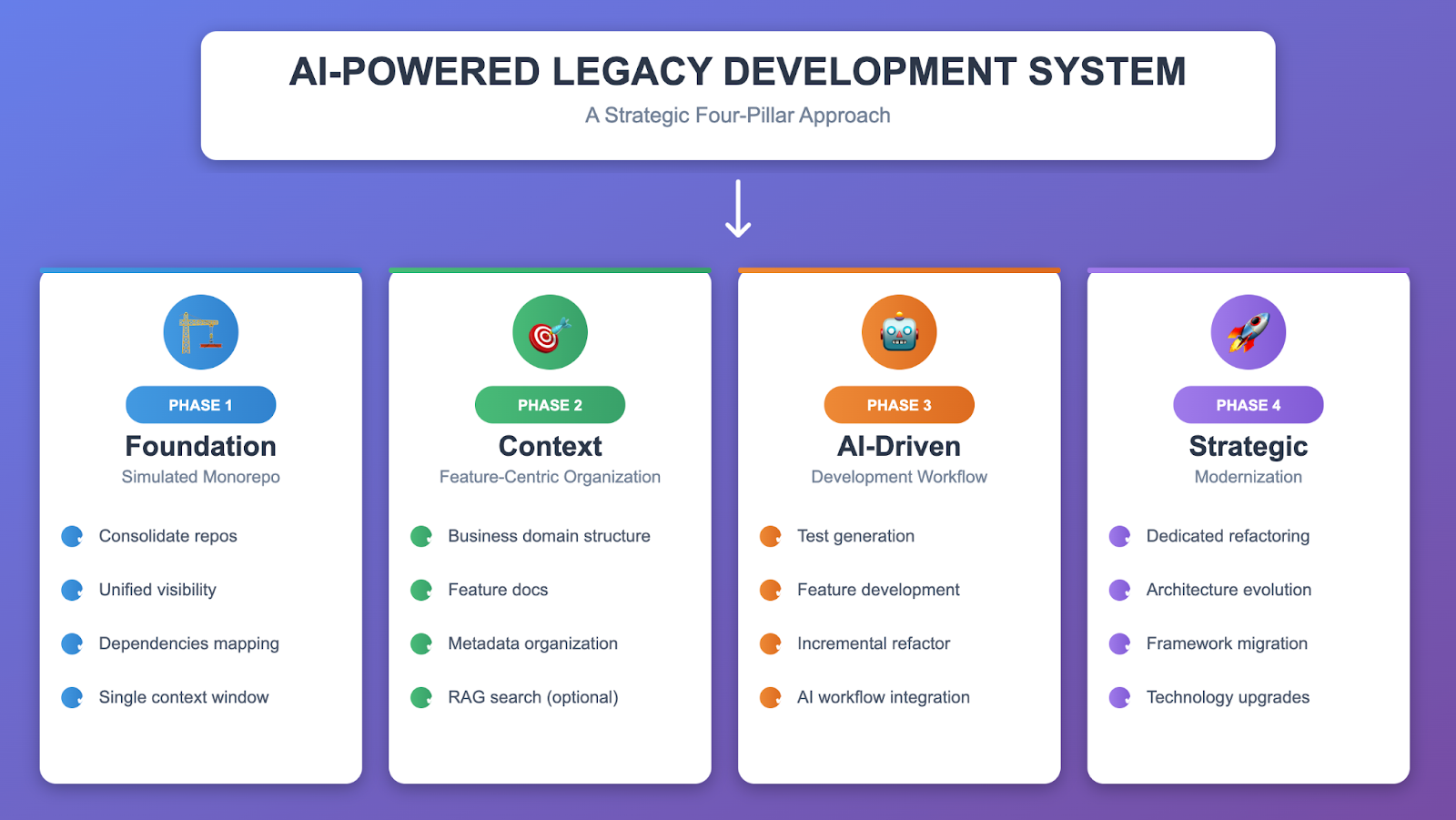
Why This Approach Works
For AI Context: Monorepos give LLMs maximum visibility into code relationships, dependencies, and patterns.
For Feature Development: Rich context enables AI to understand existing patterns and integrate new code properly.
For Modernization: AI can refactor incrementally during feature work, avoiding big-bang rewrites.
Research Finding: Google’s AI model trained on monorepo data achieved significantly higher success rates when given proper context versus isolated files.
Phase 1: Foundation – Simulated Monorepo
Objective
Create a unified codebase structure in a git repository that maximizes AI comprehension while preserving the ability to maintain separate deployment pipelines.
Why “Simulated” Monorepo?
Rather than forcing teams to adopt true monorepo workflows, we create a unified git repository for AI analysis while maintaining existing repository structures for deployment. This gives AI tools complete visibility to understand dependencies and relationships across the entire codebase.
Benefits for AI: – Complete codebase visibility in a single context window
Accurate dependency resolution across module boundaries
Pattern recognition across related codebases
Understanding of code relationships and feature interactions
Implementation Steps
Step 1.1: Repository Inventory
Create a map of all related code repositories:
# legacy-inventory.yaml
repositories:
  - name: customer-service
    type: backend
    language: csharp
    framework: aspnet-webapi-4.x

  - name: order-processing
    type: backend
    language: csharp
    framework: aspnet-webforms

  - name: admin-portal
    type: frontend
    language: typescript
    framework: angular-1.x
Tools: cloc, git history analysis, dependency scanners
Step 1.2: Monorepo Structure Design
Design a logical structure that groups code by business domain:
legacy-monorepo/
├── apps/
│   ├── customer-service/        # Original repo 1
│   ├── order-processing/        # Original repo 2
│   └── admin-portal/           # Original repo 3
├── libs/
│   ├── shared-utils/
│   └── common-models/
├── docs/
│   └── features/               # Feature-centric documentation
│       ├── customer-management/
│       └── order-processing/
├── analysis/
│   ├── dependency-graph.json
│   └── feature-map.json
└── .ai/
    └── context-index.yaml      # AI navigation aid
Step 1.3: Code Consolidation
Snapshot Approach (Recommended for AI setup):
# Clone repos and copy to structure
for repo in customer-service order-processing admin-portal; do
  git clone git@github.com:org/$repo.git temp/$repo
  cp -r temp/$repo/* apps/$repo/
done

# Initial commit
git add .
git commit -m "Initial monorepo consolidation for AI context"
Step 1.4: Dependency Mapping
Generate an initial dependency graph to help AI understand module relationships:
Tools: Lattix, NDepend (.NET), Madge (TypeScript), Roslyn (C# AST analysis)
Output (simplified example):
{
  "modules": [
    {
      "id": "customer-service",
      "provides": ["CustomerAPI", "AuthService"],
      "depends_on": ["shared-utils"],
      "calls": ["order-processing/OrderAPI"]
    }
  ]
}
Phase 1 Outputs
Unified repository structure
Complete codebase visibility for AI
Initial dependency mapping
Foundation for context building
Phase 2: Context – Feature-Centric Organization
Objective
Structure knowledge around business features (not code structure) to maximize AI’s ability to understand business logic, relationships, and integration points.
Why Feature-Centric Organization?
Traditional code organization (by layer, by technology) doesn’t help AI understand what the code does from a business perspective. Feature-centric organization groups all context—code, docs, dependencies, business rules—around business capabilities.
Business Domain Structure:
docs/features/
├── customer-management/
│   ├── registration/
│   │   ├── overview.md           # Business description
│   │   ├── business-rules.md     # Validation rules, calculations
│   │   ├── code-locations.md     # Where the code lives
│   │   └── dependencies.md       # What it depends on
│   ├── loyalty-program/
│   └── authentication/
└── order-processing/
    ├── cart/
    ├── checkout/
    └── fulfillment/
Step 2.1: Feature Identification & Mapping
Approach: Use AI to analyze code and extract business features.
Workflow:
Provide AI with code modules and dependency data
Ask AI to identify business capabilities
Map code locations to business features
Document entry points and integration points
AI Prompt Pattern:
Analyze the following code module and identify:
1. Business features implemented
2. Business rules (validation, calculation, workflow)
3. Entry points (API endpoints, controllers)
4. Dependencies on other modules
5. Data entities managed

[Module code + call graph + usage stats]
[Module code + call graph + usage stats]
Output Example:
{
  "feature": "customer-registration",
  "domain": "customer-management",
  "description": "New customer signup with email validation and loyalty account creation",
  "entry_points": [
    "CustomerController.Register (apps/customer-service/.../CustomerController.cs:45)"
  ],
  "business_rules": [
    "Email must be unique (case-insensitive)",
    "Password minimum 8 characters",
    "Default loyalty tier is Bronze"
  ],
  "dependencies": [
    "EmailValidator (shared-utils)",
    "LoyaltyService (customer-service)"
  ]
}
Step 2.2: Create AI-Readable Feature Documentation
For each feature, create structured documentation that AI can consume:
Template: docs/features/{domain}/{feature}/overview.md
# Feature: Customer Registration

## Business Purpose
Allow new customers to create accounts with email/password authentication.

## Entry Points
- **API**: `POST /api/customers/register`
- **Code**: `CustomerController.Register` (apps/customer-service/.../CustomerController.cs:45)

## Business Rules

### Email Validation
- Must be unique across all customers (case-insensitive)
- Supports plus addressing (user+tag@domain.com)

### Password Requirements
- Minimum 8 characters
- Must contain: uppercase, number

### Loyalty Program
- New customers get Bronze tier by default
- First registration awards +100 bonus points

## Code Locations
- Controller: apps/customer-service/.../CustomerController.cs:45-89
- Service: apps/customer-service/.../CustomerService.cs:123-178
- Validators: apps/shared-utils/.../EmailValidator.cs:23-56

## Dependencies
- **Calls**: EmailValidator, LoyaltyService, CustomerRepository
- **Called By**: Admin bulk import, partner integrations

## Test Coverage
- Current: Good coverage
- Test file: apps/customer-service/test/.../CustomerServiceTest.cs

## Status
- Classification: CORE (high usage)
- Last Modified: 2024-08-15
Step 2.3: AI Context Index
Create a master index that helps AI quickly navigate features:
File: .ai/context-index.yaml
# AI Context Index - Quick navigation for features

domains:
  customer-management:
    features:
      registration:
        summary: New customer signup
        docs: docs/features/customer-management/registration/
        code: apps/customer-service/src/.../customer/
        tests: apps/customer-service/test/.../CustomerServiceTest.cs
        classification: CORE

      loyalty-program:
        summary: Points calculation and tier management
        docs: docs/features/customer-management/loyalty-program/
        code: apps/customer-service/src/.../loyalty/
        classification: CORE

  order-processing:
    features:
      checkout:
        summary: Order placement and payment
        docs: docs/features/order-processing/checkout/
        code: apps/order-processing/src/.../checkout/
        classification: CORE
Step 2.4: RAG Setup (Optional for Large Codebases)
For codebases too large to fit in a single AI context window, semantic search enables efficient context retrieval.
Approach: Vector embeddings of code and documentation for similarity-based search.
Benefits: – AI finds relevant context for complex queries – Reduces context window noise – Handles multi-million line codebases
See Appendix B: RAG Setup for implementation details.
Phase 2 Outputs
Business domain structure
Feature documentation for all major features
AI-readable context index
RAG-enabled semantic search (optional for large codebases)
Clear entry points and integration patterns
Phase 3: AI-Driven Development
Objective
Use the rich context built in Phases 1-2 to enable AI to drive all development activities: testing existing code, building new features, and incrementally modernizing during feature work.
Part A: Building Confidence Through Test Generation
Why Test Generation First?
Before AI builds new features or refactors code, establish a safety net by generating comprehensive tests for existing functionality.
Benefits: – Confidence to make changes without breaking existing features – Documentation of current behavior – Regression detection during refactoring – Foundation for feature development
Context-Aware Test Generation Workflow
Step 1: Select a feature to test (from context index)
Step 2: Gather complete context: – Feature business rules (from docs/features/) – Current implementation code – Dependencies and integration points – Existing tests (if any)
Step 3: Use AI to generate comprehensive tests
Part B: AI-Powered Feature Development
The AI Feature Development Workflow
Once features have test coverage and documentation, AI can build new features that integrate properly with existing code.
Key Success Factors:
Tech Context Documentation: Create guidelines for AI to follow legacy patterns
Framework-specific patterns (e.g., ASP.NET 4.7 conventions)
Legacy library usage (deprecated APIs, workarounds)
Coding standards and architectural patterns
Error handling and logging conventions
Feature Planning: AI analyzes existing patterns and integration points
Implementation: AI generates code following established conventions
Testing: Comprehensive test generation alongside implementation
Part C: Incremental Modernization
Modernization During Feature Work
Instead of dedicated modernization sprints, AI refactors incrementally while working on features.
Approach: When AI builds or modifies a feature, it identifies and implements improvements to related code.
Typical Improvements: – Convert synchronous operations to async – Add caching layers (Redis, in-memory) – Modernize deprecated library usage – Improve error handling and logging – Refactor for better testability
Strategy: – Maintain backward compatibility – Gradual rollout with feature flags – Low-risk, high-impact changes – Continuous improvement without dedicated sprints
Typical Results: – Significant performance improvements on critical paths – Substantially reduced infrastructure load – Modern patterns adopted incrementally – Zero breaking changes
Phase 3 Outputs
Comprehensive test coverage for existing features
New features built by AI following existing patterns
Incremental modernization during feature work
Significantly reduced development time
Maintained or improved code quality
Phase 4: Strategic Modernization
Objective
While Phase 3 handles incremental modernization during feature work, some architectural changes require dedicated, planned initiatives. AI assists with analysis, planning, and execution of large-scale refactoring.
When to Use Strategic Modernization
Incremental (Phase 3): Opportunistic improvements during features – Performance optimizations – Pattern consistency – Local refactoring
Strategic (Phase 4): Planned architectural changes – Framework migrations (ASP.NET 4.x → ASP.NET Core) – Architecture evolution (monolith → microservices) – Technology upgrades (Angular 1.x → React) – Cross-cutting concerns (authentication, logging overhauls)
AI-Assisted Approach
Migration Planning: AI analyzes current architecture and creates phased migration plan
Implementation: AI migrates features one at a time, preserving business logic
Testing: AI generates equivalent tests for new implementation
Gradual Rollout: Feature flags enable safe, incremental deployment
Key Strategies
Strangler Fig Pattern: Build new alongside old, migrate incrementally
API Compatibility Layers: Maintain contracts during migration
Parallel Run: Keep both versions live during transition
Automated Testing: Regression detection and behavior verification
Phase 4 Outputs
Migration plans for framework upgrades
AI-assisted code migration (preserving behavior)
Architecture evolution (microservices, modular monolith)
Gradual rollout strategies (low risk)
Comprehensive testing (regression prevention)
Results & Metrics
Quality Improvements
Test Coverage: Significant increase from low baseline to comprehensive coverage
Documentation: Transformed from outdated to current, auto-generated documentation
Code Duplication: Substantial reduction through AI-driven refactoring
Cyclomatic Complexity: Meaningful decrease in code complexity
Development Velocity
Feature Development: Dramatically faster development cycles
Test Writing: Rapid test generation compared to manual effort
Refactoring: Shifted from avoided (too risky) to continuous improvement
Documentation: Auto-generated documentation versus manual, time-intensive process
Cost Savings
Engineering Efficiency: Major reduction in feature development time
Infrastructure: Reduced database load enabling smaller infrastructure
Maintenance: Significantly lower bug fix effort due to comprehensive tests
Knowledge Transfer: Faster onboarding with up-to-date documentation
Lessons Learned
What Worked Well
Monorepo consolidation dramatically improved AI context quality
AI suggestions were significantly more accurate with full codebase visibility
Dependency issues surfaced earlier
Pattern recognition across modules
Feature-centric documentation enabled practical AI assistance
AI understood business intent, not just code structure
Integration points clearly documented
Business rules preserved during refactoring
Test generation built confidence for AI-driven development
Teams trusted AI-generated code more with comprehensive tests
Regressions caught in canary phase
Safety net for refactoring
Incremental modernization avoided big-bang rewrites
Continuous improvement during feature work
Low risk (gradual rollout)
No dedicated modernization sprints needed
RAG-based semantic search enabled precise context retrieval
Found related code that keyword search missed
Substantially reduced context window waste
Handled codebases too large for single context
Challenges & Solutions
Challenge: AI occasionally hallucinated business rules in initial extractions
Solution: Added human review step + validation against tests
Challenge: Context window limits for large modules
Solution: Use Doc Map
Challenge: Team skepticism about AI-generated code quality
Solution: Started with test generation (lower risk), built trust incrementally
Challenge: Complex refactorings sometimes broke edge cases
Solution: Always deployed with feature flags + gradual rollout
Challenge: Initial setup effort (monorepo, documentation)
Solution: Payoff within first few features; investment recovered quickly
Best Practices Developed
Always generate tests before refactoring – Builds confidence and catches regressions
Use feature flags for all AI-assisted changes – Enables instant rollback
Monitor error patterns post-deployment – Catches edge cases
Keep humans in the loop for business rule validation – AI is good but not perfect
Version control AI prompts and context – Makes results reproducible
Start with high-value, low-risk features – Build trust before tackling critical paths
Implementation Roadmap
Phase 1: Foundation
Repository Consolidation
Inventory all legacy repositories
Design monorepo structure
Consolidate code using git subtree/snapshot
Generate initial dependency graph
Initial Analysis
Deploy dependency analysis tools (Lattix, NDepend)
Generate call graphs
Create AI-readable metadata structure
Deliverables: Unified monorepo, Dependency graph, Analysis baseline
Phase 2: Context Building
Feature Identification
Use AI to analyze code and extract business features
Map code locations to business capabilities
Identify feature boundaries and dependencies
Documentation Generation
Create feature documentation templates
Generate business rules docs (AI-assisted)
Build dependency maps per feature
Context Infrastructure
Set up RAG index (for large codebases)
Create context index (.ai/context-index.yaml)
Test semantic search accuracy
Deliverables: Feature map, Business rules docs, RAG search, Context index
Phase 3: AI Development Workflow
Test Generation Pilot
Select several core features
Generate comprehensive tests with AI
Measure coverage improvement
Refine prompts based on results
Feature Development Pilot
Build new features with AI assistance
Follow established workflow
Measure development time reduction
Incremental Refactoring
Modernize opportunistically during features
Establish refactoring patterns
Document lessons learned
Deliverables: Comprehensive test coverage (core features), AI feature workflow, Time savings metrics
Phase 4: Scale & Optimize (Ongoing)
Regular Activities
Expand test coverage to additional features
Build new features with AI assistance
Incremental modernization across codebase
Evaluate strategic modernization opportunities
Plan framework migrations or architecture evolution
Update documentation and context
Deliverables: Continuous improvement, Feature velocity, Modern codebase
Conclusion
AI-driven legacy development is no longer experimental—it’s a proven approach delivering measurable results. By investing in three foundational elements:
Simulated Monorepo – Complete visibility for AI
Feature-Centric Context – Business understanding for AI
AI-Driven Workflow – AI as development partner
Organizations achieve significant efficiency gains, improved quality, and continuous modernization (without dedicated sprints).
The key insight: Context is everything for AI. By investing upfront in Phases 1-2 (monorepo + context), the payoff in Phases 3-4 is dramatic—AI becomes a force multiplier that accelerates development while maintaining or improving quality.
With the right approach, even the most daunting legacy codebase can be systematically modernized—and AI makes it not just possible, but practical and continuous.


