
Principles are useful, but they don’t tell you what to practice.
In my previous post on intelligent Engineering principles, I outlined the ideas that guide how I build software with AI. Since then, I’ve had people ask: “Where do I start? What skills should I build first?”
This post answers that: a map of the skills that make up intelligent Engineering, organised into a learning path you can follow whether you’re an individual contributor looking to level up or a tech leader building your team’s AI fluency.
What is intelligent Engineering?
intelligent Engineering is a framework for integrating AI across the entire software development lifecycle, not just code generation.
Writing code represents only 10-20% of software development effort. The rest is research, analysis, design, testing, deployment, and maintenance. intelligent Engineering applies AI across all of these stages while keeping humans accountable for outcomes.
I’ve already written about the five core principles in detail. This post focuses on the skills that make those principles actionable.
The Skill Map
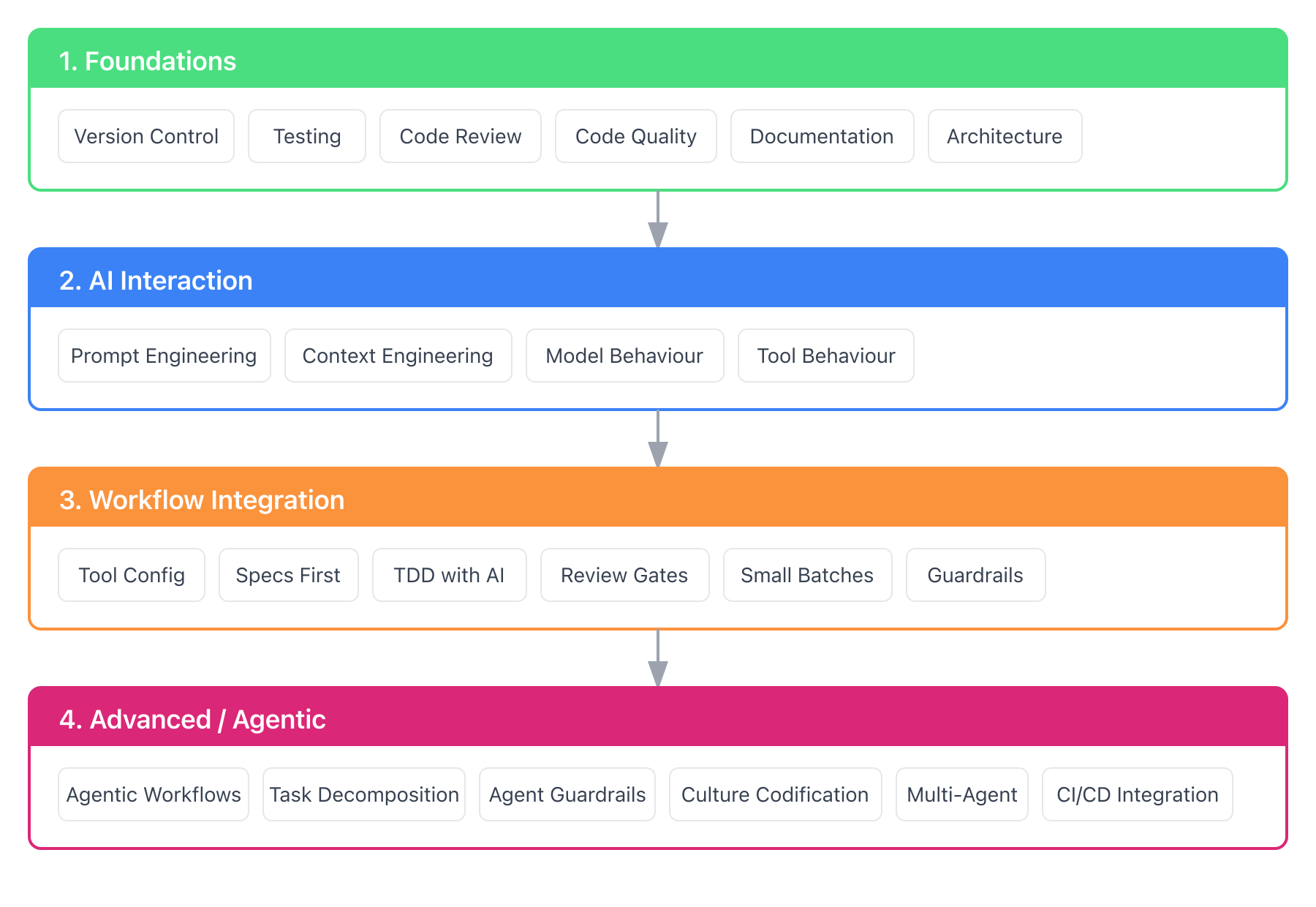
Master the skills at each stage before moving to the next. Skipping ahead creates gaps that AI will expose.
1. Foundations
The 2025 DORA report confirmed what many suspected: AI amplifies your existing capability, magnifying both strengths and weaknesses.
If your fundamentals are weak, AI won’t fix them. It will make the cracks more visible, faster.
This map assumes you already have solid computer science fundamentals: data structures, algorithms, and an understanding of how systems work (processors, memory, networking, databases, etc.). AI doesn’t replace the need to know these.
Version control fluency
Git workflows, meaningful commits, safe experimentation with branches. AI generates code quickly. If you can’t safely integrate and roll back changes, you’ll spend more time cleaning up than you save.
How to build this:
- If you haven’t used branches and pull requests regularly, start a side project that forces you to
- Read Pro Git (free online) – chapters 1-3 cover the essentials
- Learn git worktrees – you’ll need them for multi-agent workflows in the Advanced section
Testing fundamentals
The test pyramid still applies. Unit, integration, end-to-end. AI can generate tests, but knowing which tests matter, when to push tests up or down the pyramid, and reviewing their quality is your job. Build intuition for what belongs at each layer.
How to build this:
- Practice writing tests before code (TDD) on a small project
- Read Test-Driven Development: By Example by Kent Beck, the foundational TDD book
- Read Growing Object-Oriented Software, Guided by Tests by Steve Freeman and Nat Pryce for TDD in practice
- Apply Martin Fowler’s test pyramid rule: if a unit test covers it, don’t duplicate at higher levels. Push tests down: unit test business logic, integration test service interactions, end-to-end only for critical user paths
Code review discipline
You’ll review more code than ever. AI-generated code often looks plausible but handles edge cases incorrectly. Strengthen your eye for subtle bugs.
What to watch for in AI-generated code:
- Security vulnerabilities: SQL injection, unsafe data handling, hardcoded secrets. AI often generates patterns that work but aren’t secure.
- Edge cases: Null handling, empty collections, boundary conditions. AI tends to handle the happy path well but miss edge cases.
- Business logic errors: AI can’t understand your domain. Verify that the code does what the business actually needs, not just what the prompt described.
- Architectural violations: Does the code respect your layer boundaries? Does it follow your ADRs? AI doesn’t know your architectural constraints unless you tell it.
- Code smells: Duplicated logic, overly complex methods, inconsistent patterns. AI doesn’t always match your codebase conventions.
- Hallucinated APIs: Functions or methods that look real but don’t exist. Always verify imports and dependencies.
How to build this:
- Review pull requests on open source projects you use
- Read Code Review Guidelines from Google’s engineering practices
- Practice the “trust but verify” mindset: assume AI code needs checking, not approval
Code quality intuition
Can you recognize maintainable, clean code vs technically-correct-but-messy? AI generates code fast. If you can’t tell good from bad, you’ll accept garbage that costs you later.
How to build this:
- Read Clean Code by Robert Martin
- Refactor old code you wrote, or practice on clean code katas – notice what makes code hard to change
Documentation practices
Documentation becomes AI context. Quality documentation into the system means quality AI output. Poor docs mean the AI hallucinates or makes wrong assumptions.
How to build this:
- Document a project you’re working on as if a new teammate needs to understand it
- Read Docs for Developers for practical guidance
Architecture understanding
Data flow, component boundaries, dependency management. AI tools need you to describe constraints clearly. If you don’t understand the architecture, you can’t provide good context.
How to build this:
- Draw architecture diagrams for systems you work with
- Read Fundamentals of Software Architecture by Richards and Ford for trade-offs and patterns
- Read Designing Data-Intensive Applications by Kleppmann for distributed systems and data architecture
- For microservices specifically, read Building Microservices by Sam Newman
2. AI Interaction
The skills specific to working with AI systems. You’re learning to communicate with a system that’s capable but context-limited, confident but sometimes wrong.
Prompt engineering basics
Specificity matters. Vague requests get vague results.
Bad prompt:
Write a function to parse datesCopy
Good prompt:
Write a Python function that:
- Parses ISO 8601 date strings (e.g., "2025-12-31T14:30:00Z")
- Handles timezone offsets
- Returns None for invalid input
- Include docstring and type hints
Copy
The difference isn’t cleverness – it’s precision.
Key techniques:
Technique | What It Is | When to Use |
|---|---|---|
Specificity | Precise requirements over vague requests | Always – the biggest lever |
Few-shot prompting | Show 1-3 examples of input → output | Team patterns, consistent formatting |
Chain of thought | “Think step-by-step: analyze, identify, explain, then fix” | Debugging, complex reasoning |
Role prompting | “Act as a senior security engineer reviewing for vulnerabilities” | When expertise framing helps |
Meta prompting | Prompts that generate or refine other prompts | Org-level standards, team templates |
Explicit constraints | “Don’t use external libraries. Keep it under 50 lines.” | Avoiding common failure modes |
Few-shot example:
Convert these function names from camelCase to snake_case:

Example 1: getUserById -> get_user_by_id
Example 2: validateEmailAddress -> validate_email_address

Now convert: fetchAllActiveUsers
Copy
Chain of thought example:
Debug this function. Think step-by-step:
1. What is this function supposed to do?
2. Trace through with input X - what happens at each line?
3. Where does the actual behavior differ from expected?
4. What's the fix?
Copy
How to build this:
- Spend a week being deliberate about prompts. Write down what you asked, what you got, and what you wish you’d asked.
- Read Anthropic’s Prompt Engineering Guide
- Reference promptingguide.ai for comprehensive techniques
Context engineering
A clever prompt won’t fix bad context. Context engineering is about curating what information the model sees: project constraints, coding standards, relevant examples, what you’ve already tried.
This is the 80% of the skill. Prompt engineering is maybe 20%.
I’ve written a detailed guide on this: Context Engineering for AI-Assisted Development.
How to build this:
- Create a project-level context file (e.g., CLAUDE.md) for your current codebase
- Add coding standards, architectural constraints, common patterns
- Notice when AI output improves because of better context
Understanding model behaviour
You don’t need to become an ML engineer, but knowing the basics helps.
What to understand:
Concept | Why It Matters |
|---|---|
Context windows | Why your 50-file codebase overwhelms the model. Why it “forgets” earlier instructions. (Anthropic’s context window docs) |
Training data & fine-tuning | Why Claude excels at code review. Why some models are verbose, others concise. |
Knowledge cutoff | Why the model doesn’t know about libraries released last month. |
Hallucinations | Models confidently generate plausible-looking nonsense. Verify APIs exist. Test edge cases. |
Cost per token | Why Opus is expensive for exploration but worth it for complex reasoning. (Anthropic pricing) |
Model strengths (from my experience):
Model | Strengths |
|---|---|
Claude | Thoughtful about edge cases, good at following complex instructions, strong code review |
GPT | Fast, good at general tasks, wide knowledge |
Gemini | Larger context windows, good at multimodal tasks |
These observations come from my own work. Models evolve quickly – what’s true today may change next quarter.
How to build this:
- Try the same task with different models. Note where each excels.
- Read model release notes when new versions come out
- Track which models work best for your common tasks
Understanding tool behaviour
Here’s something that trips people up: the same model behaves differently in different tools.
Cursor’s Claude is not the same as Claude Code’s Claude is not the same as Windsurf’s Claude. Why? Each tool wraps the model with its own system prompt.
Aspect | Model Nuances (Intrinsic) | Tool Nuances (Extrinsic) |
|---|---|---|
What it is | Differences baked into the model itself | Differences from how the tool wraps the model |
Examples | Context window, reasoning style, training data, cost | System prompts, UI, context injection, available commands |
What to learn | Model strengths for different tasks | How your tool injects context, what its system prompt optimizes for |
This means: instructions that work well in Claude Code might not work the same in Cursor, even with the same underlying model. The tool’s system prompt and context injection change the behavior.
How to build this:
- Try the same prompt in multiple tools. Notice the differences.
- Read your tool’s documentation on how it manages context
- Understand what your tool’s system prompt optimizes for (coding, conversation, etc.)
3. Workflow Integration
Making AI a standard part of how you build software, not a novelty you occasionally use.
Tool configuration
Configure your AI tools for your team’s context. This isn’t a one-time setup. Rules files need tuning. Context evolves. Tools update frequently.
Each tool has its own configuration mechanism:
- Claude Code uses CLAUDE.md files
- Cursor uses rules
- Windsurf uses memories
Instructions that work in one tool won’t transfer directly to another because system prompts differ.
How to build this:
- Document your configuration so teammates can get productive quickly
- Review and update configuration monthly as tools evolve
Specs-before-implementation
Define what to build before AI generates code. AI generates code that matches a spec well. It struggles to determine what the spec should be.
Write the spec first – acceptance criteria, edge cases, constraints. Then let AI implement.
How to build this:
- Practice writing specs for features before touching code
- Include: what it should do, what it shouldn’t do, edge cases to handle
Test-driven mindset with AI
Write tests first. Let AI implement to pass them. This flips the usual flow: instead of “generate code, then test it”, you “define the contract, then fill it in.”
The tests become your spec. When AI has an executable target (tests that must pass), it produces better code than when interpreting prose requirements.
How to build this:
- Try TDD on a small feature: write failing tests, then ask AI to make them pass
- Review the generated code – does it just satisfy the tests or is it actually good?
Human review gates
AI-generated code requires the same (or stricter) review as human-written code. Build the habit of treating AI output like code from a confident junior developer: often correct, sometimes subtly wrong, occasionally completely off base.
How to build this:
- Set a personal rule: no AI-generated code merged without reviewing every line
- Track your AI acceptance rate. If you’re accepting >80% without modification, you might be over-trusting.
Small batches
Generate less, review more. A 1000-line AI diff is harder to review than a 100-line one. Work in small chunks. Commit often.
How to build this:
- Break tasks into steps that produce <200 lines of change
- Commit after each step passes review
Quality guardrails
Integrate linting, static analysis, and security scanning into your workflow. These catch issues AI introduces. Shift left. Catch problems early.
How to build this:
Living documentation
Documentation updated atomically with code changes. When code changes, docs change in the same commit. This keeps your AI context current.
How to build this:
- Include doc updates in your definition of done
- Review PRs for documentation staleness
4. Advanced / Agentic
Skills for autonomous AI workflows. These are powerful but risky – more autonomy needs stronger guardrails.
Agentic workflow design
Tools like Claude Code, Cursor, and Windsurf can run shell commands, edit files, and chain actions. Know what your tool can do and design workflows that leverage it.
How to build this:
- Start with supervised agents – review each step before allowing the next
- Read Claude Code’s GitHub Actions integration for CI/CD examples
Task decomposition
Break complex work into subtasks an agent can handle. Good decomposition is a skill in itself. Too big and the agent loses focus. Too small and you spend all your time orchestrating.
How to build this:
- Practice breaking features into agent-sized tasks (~30 min of work each)
- Notice which decompositions lead to better agent output
Guardrails for agents
More autonomy needs stronger guardrails. Sandboxing, approval gates, rollback procedures. Agents make mistakes. Build systems that catch them.
How to build this:
- Never give agents write access to production
- Implement approval gates for destructive operations
Engineering culture codification
Turn your team’s standards, patterns, and guidelines into structured artifacts that AI can use. This is how you scale intelligent Engineering beyond individuals.
When you document coding standards, architectural patterns, and review checklists in a format AI can consume, every team member (and AI tool) operates from the same playbook.
How to build this:
- Start with a CLAUDE.md (or equivalent) that captures your team’s conventions
- Add architectural decision records (ADRs) that AI can reference
Multi-agent orchestration
Running parallel agents (e.g., using git worktrees). Coordinating results. This is emerging territory.
How to build this:
- Try running two agents on independent tasks
- Notice coordination challenges and develop patterns for handling them
CI/CD integration
Running AI reviews on pull requests. Automated code analysis. Scheduled agents for maintenance tasks.
How to build this:
- Set up Copilot code review or similar on your repo
- Start with comment-only (no auto-merge) until you trust it
Learning Paths
Not everyone starts from the same place.
For Developers New to AI Tools
Start here: Foundations + AI Interaction basics
- Get comfortable with one AI tool. GitHub Copilot is a good starting point for its low cost and tight editor integration. For open source alternatives, try Aider or OpenCode.
- Spend 2-4 weeks using it for completion and simple generation.
- Practice prompting: be specific, iterate, learn what works.
- Move to a more capable tool (Claude Code, Cursor, Windsurf) once you’re comfortable.
- Build your first context file.
Expected ramp-up: 4-8 weeks to feel productive.
For Developers Experienced With AI
Start here: Workflow Integration + Advanced
- Audit your current workflow. Where are you using AI effectively? Where are you over-trusting?
- Strengthen context engineering. Create comprehensive project context files.
- Set up guardrails: linting, security scanning, review checklists.
- Experiment with agentic workflows under supervision.
- Integrate AI into CI/CD.
Expected ramp-up: 2-4 weeks to significantly improve your workflow.
For Tech Leaders Building Team Capability
Whether you’re a Tech Lead, Engineering Manager, Principal Engineer, or anyone else responsible for growing your team’s capability, this section is for you.
Start here: The 2025 DORA AI Capabilities Model
The report identified seven practices that amplify AI’s positive impact:
- Clear AI stance: Establish expectations for how your team uses AI.
- Healthy data ecosystem: Quality documentation enables quality AI outputs.
- Strong version control: Rollback capability provides a safety net for experimentation.
- Small batches: Enable quick course corrections.
- User-centric focus: Clear goals improve AI output quality.
- Quality internal platforms: Standardised tooling scales AI benefits.
- AI-accessible data: Make context available to AI tools.
Actions:
- Assess your team against these practices. Where are the gaps?
- Don’t change everything at once. Introduce AI at one delivery stage at a time.
- Expect a learning curve: 2-4 weeks of reduced productivity before gains appear.
- Invest in guardrails before acceleration.
- Measure impact with DORA metrics: deployment frequency, lead time, change failure rate, time to restore.
Common Pitfalls
Starting with advanced tools: If you skip fundamentals, you’ll produce more code, faster, with worse quality. The problems compound.
Ignoring context engineering: Most teams spend all their energy on prompt engineering. Context engineering matters far more. Good context makes mediocre prompts work; perfect prompts can’t fix missing context. And context scales: set it up once, benefit every interaction.
Over-trusting AI: “The AI suggested it” is not an acceptable answer in a post-mortem. You’re accountable for what ships.
Under-trusting AI: Some developers refuse to adopt AI tools, treating them as a passing fad. The productivity gap is real. Healthy skepticism is fine, but refusing to engage is risky. For tech leaders: DORA’s research on AI adoption shows that addressing anxieties directly and providing dedicated exploration time significantly improves adoption.
No guardrails: AI makes it easy to move fast. Without automated quality checks, you’ll ship bugs faster too. Smarter AI needs smarter guardrails. If you don’t have linting, security scanning, and CI checks, add them before increasing your AI usage. For legacy codebases without tests, start with characterization tests to capture current behaviour before refactoring. Michael Feathers’ Working Effectively with Legacy Code is the definitive guide here. AI can accelerate this process, but verify every generated test passes against the real system without any changes to production code.
Confusing model and tool behaviour: When AI output is wrong, is it the model’s limitation or the tool’s system prompt? Knowing the difference helps you fix it. To diagnose: try the same prompt in a different tool or the raw API. If the problem persists across tools, it’s likely a model limitation. If it only happens in one tool, check how that tool injects context.
Trying to measure productivity improvement without baselines: You can’t prove AI made your team faster if you weren’t measuring before. Worse, once estimates become targets for measuring AI impact, developers adjust their estimates (consciously or not). Skip the productivity theatre. Instead, measure what matters: features shipped, customer value delivered, time from idea to production, team satisfaction.
What’s Next
This skill map is a snapshot. The tools evolve weekly. New capabilities emerge monthly.
If you’re on this journey, I’d like to hear what’s working for you. What skills have I missed? What resources have you found valuable?


